
ANAHEIM, CALIF. – If there was ever any doubt that Microsoft Corp.’snext Windows release was going to be a tablet-focused OS, those opinions wereshattered on Tuesday.
The Redmond, Wash. giant, which kicked off its BUILD developer conference witha full preview of Windows 8, has designed every major feature on the new OSwith touch screens in mind. A huge change related to this shift to touch is avisual one, as the entire look and feel of Windows Phone 7 has been ported overto the desktop and tablet OS.
Windows 8’s new touch-centric overlay is unavoidable and will become thedefault “start” screen for its users. The traditional “file and folder” desktopinterface is still accessible, but is being referred to as “just another app”
“Icons are yesterday’s way of representing apps,” said Jensen Harris, directorof program management for the Windows User Experience.
The new “Metro-styled” start screen is filled with customizable “live tiles,”which can be clicked to launch apps or viewed at a glance like a series ofreal-time widgets. For example, a calendar tile might display your nextappointment, while launching the tile will open up the full calendar app.
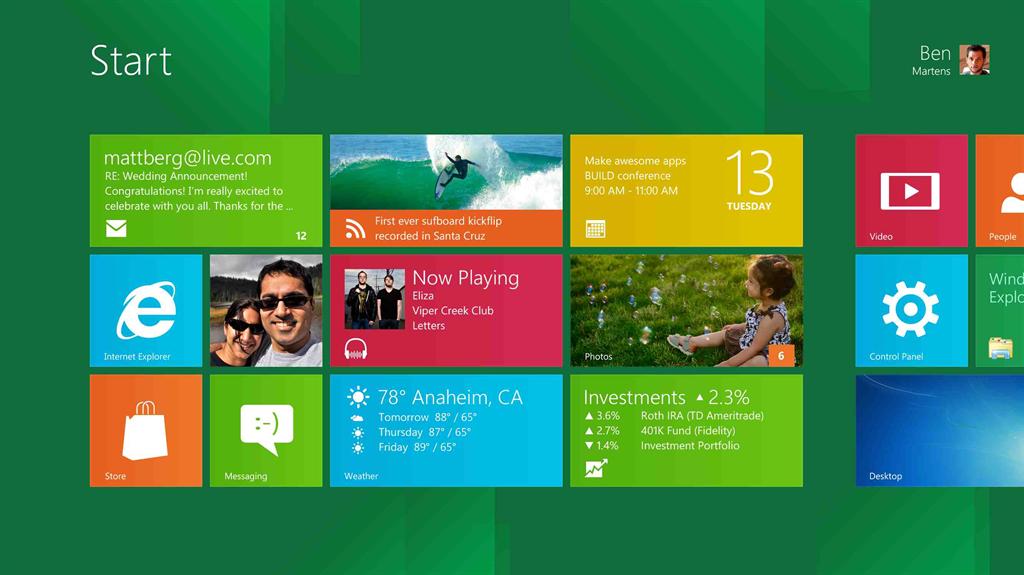
Within the new start screen UI, apps fill the entire screen to ensure they arethe focal point of the experience. While using a full screen app, users canswipe their fingers from left to right to cycle through other apps running inthe background.
“Every single pixel from the top left to the bottom right is the app,” saidJensen. “For years Windows was about the chrome. But now we’ve said we’rehumble. We’re at the service of the app.”
Microsoft is encouraging app developers to create these “Metro” style appswhenever possible to limit the amount of times users are taken back to thetraditional desktop view.
Still, in the early developer preview of the OS, users will find themselvesbeing sent back to the classic Windows 7 desktop view. The “My Computer,” advanced“Control Panel” and “Task Manager” apps all launch in their traditional desktopform.
Microsoft also admits that apps requiring the precision of a mouse such asAdobe’s Photoshop suite will continue to live on in the classic desktop UI.
Despite this, Microsoft’s goal with Windows 8 is to build a system completelydriven by a web of Metro style apps working together and constantly updated andsynced in the cloud.
Any Metro app in the system can share and receive data from any other app,Jensen said. For example, users can send pictures from one photo app toanother, with all those changes automatically linked to your Windows Livelog-in.
“We want you to be able to walk up to a PC, type your ID and get your stuff,”said Chris Jones, corporate vice-president of Windows Live.
For developers, Microsoft is providing Visual Studio 11 Express, which includesfeatures such as code auto-complete and debugging support. In addition to C#,C++, XAML or other .Net development languages, the OS can also be coded using Webdevelopment platform such as HTML5 and JavaScript.
“Making APIs available through JavaScript, we are bringing Web technologiesinto the client,” said Ales Holecek, a distinguished engineer on the Windowsdevelopment team.
To hammer home its commitment to developers, Microsoft is also launching a WindowsStore that will feature both desktop and mobile apps. After submitting an appto the store, developers will be able to follow along and get progress updatesas it works its way through Microsoft’s certification process.
Other major new features in the operating system include the ability to booth withinseconds, full support of USB 3.0 and the inclusion of Hyper-V for virtualdesktop functionality.
